The Pippin Chrome Extension
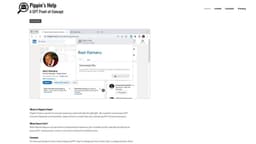
The Pippin Chrome Extension is an AI job search assistant that generates bios, evaluates job listings, and creates custom cover letters.
Introduction
The Pippin Chrome Extension is a GPT prototype for a job search assistant. It is built using OpenAI's GPT API and aims to generate professional bios, evaluate job listings for personal fit, and create custom cover letters tailored to individual roles.
What stands out?
Generate professional bios based on your LinkedIn profile
Evaluate job listings for personal fit
Generate custom cover letters tailored to individual roles
Frequently Asked Questions
What is The Pippin Chrome Extension?
How to use The Pippin Chrome Extension?
Q1
A1
Q2
A2
Q3
A3
Q4
A4
More Information
The Pippin Chrome Extension Support Email & Customer service contact & Refund contact etc.
Here is the The Pippin Chrome Extension support email for customer service: [email protected] . More Contact, visit the contact us page(mailto:[email protected])
Reviews & Feedback
Share your experience with the community
0.0
Based on 0 reviews
User Comments (0)
Sort Criteria
Order
No reviews yet. Be the first to share your thoughts!
Statistics
Monthly visits
NaN
Saved by users
0
Rating
0.0/ 5.0
Added on
—
Use Cases
- Creating a compelling and professional bio for your LinkedIn profile
- Assessing job listings to determine if they align with your skills and interests
- Crafting personalized cover letters that stand out to potential employers
How to Use
1. Visit the ChatGPT webpage and log in. 2. Log in to your LinkedIn account in the same browser. 3. Open the Pippin's Help extension from your menu bar. 4. Choose the tab for Bio, Role fit, or Cover Letter. 5. Click the Generate button to generate new content.