Introduction
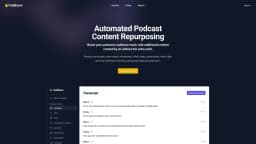
PodBravo is a podcast automation tool for busy hosts. It allows users to turn their podcast episodes into additional content with AI.
What stands out?
Transcripts
Show Notes
Timestamps
Titles
Blog & Social Posts
Frequently Asked Questions
What is PodBravo?
How to use PodBravo?
What AI do you use?
Is my data secure?
Will I be able to access my content after my subscription ends?
What languages do you support?
What if I don't use all my minutes in a month?
What is your refund and cancellation policy?
I have more questions or need help.
More Information
PodBravo Support Email & Customer service contact & Refund contact etc.
Here is the PodBravo support email for customer service: [email protected] . More Contact, visit the contact us page(mailto:[email protected])
PodBravo Company
PodBravo Company name: PodBravo . More about PodBravo, Please visit the about us page(https://podbravo.com/about).
PodBravo Login
PodBravo Login Link: https://podbravo.com/login
PodBravo Sign up
PodBravo Sign up Link: https://podbravo.com/register?plan=solo
PodBravo Pricing
PodBravo Pricing Link: https://podbravo.com/#pricing
PodBravo Linkedin
PodBravo Linkedin Link: https://www.linkedin.com/company/podbravo
PodBravo Twitter
PodBravo Twitter Link: https://twitter.com/PodBravoSupport
Reviews & Feedback
Share your experience with the community
0.0
Based on 0 reviews
User Comments (0)
Sort Criteria
Order
No reviews yet. Be the first to share your thoughts!
Statistics
Monthly visits
NaN
Saved by users
0
Rating
0.0/ 5.0
Added on
—
Similar Tools

OpusClip Captions
Easily add animated captions to your videos with just one click using this innovative application. Enhance your videos instantly!

NoteGPT
Summarize videos, articles, and text with AI. Chat with AI assistant. Transcript generator. Automated note-taking. Folder management.

Kapwing
Collaborate online with Kapwing to create, customize, and expand your content effortlessly.
Use Cases
- Boost your podcast's audience reach with additional content created by AI without the extra work.
How to Use
Produce transcripts, show notes, timestamps, titles, blogs, social posts, video clips, and more with just one click.