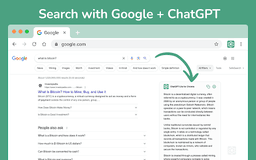
ChatGPT Lite - Chrome Extension
Browser extension with OpenAI's language model
Introduction
ChatGPT Lite is a powerful browser extension that integrates OpenAI's language model into search engine results, enabling direct interaction with ChatGPT for information retrieval.
What stands out?
Direct access to ChatGPT via toolbar and Omnibox
Responses from ChatGPT on search result pages
Extended GPT session maintenance
Frequently Asked Questions
What is ChatGPT Lite?
How to use ChatGPT Lite?
What is ChatGPT?
What is ChatGPT for Google?
Is ChatGPT for Google free to use?
What search engines are supported?
Do I need a ChatGPT/OpenAI account?
Reviews & Feedback
Share your experience with the community
0.0
Based on 0 reviews
User Comments (0)
Sort Criteria
Order
No reviews yet. Be the first to share your thoughts!
Statistics
Monthly visits
NaN
Saved by users
0
Rating
0.0/ 5.0
Added on
—
Similar Tools

AI PDF Summarizer by PDF Guru
Simplify PDFs with AI! Summarize, extract key points, ask questions, and translate in 80+ languages. Perfect for work, study, or research.
DeepSeek
Cutting-edge AI platform for programming and chatting with publicly available models, offering advanced capabilities and features.

PolyBuzz
PolyBuzz offers free, private, and unrestricted AI chat and immersive roleplay with over 20 million characters.

AI Therapy
Your personal AI therapist for round-the-clock mental health support.

Wanderboat AI Travel Planner
Discover your personalized travel experiences with AI travel planner. Tailored recommendations for your perfect trip. Start planning now!
Use Cases
- Engaging in conversations with ChatGPT for instant information
- Enhancing search engine results with ChatGPT responses
How to Use
To use ChatGPT Lite, log in to https://chat.openai.com and access it through the toolbar icon or by typing 'GPT' in the Omnibox. Report any issues on the extension's review page if needed.