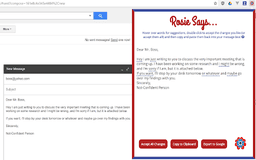
Rosie - Chrome Extension
Boost confidence with language corrections.
Language enhancementProfessional developmentConfidence building
Introduction
A Chrome extension that detects undermining language and suggests confident phrasing for professionals.
Key Features
Language correction
Suggestions for confident phrasing
Frequently Asked Questions
What is Rosie?
How to use Rosie?
What websites does Rosie support?
Similar Tools

LimeChat
Revolutionize your e-commerce business with our AI-powered platform that offers support and marketing through WhatsApp. Boost sales and engagement now!

Plagiarism Remover
Eliminate plagiarism in your text with this free AI tool. Enhance your writing by rephrasing content effortlessly. Try it now!

iSlide
Simplify your PowerPoint design with our innovative platform, offering a wide range of templates and AI tools to enhance your presentations.
Use Cases
- Enhancing workplace communication
- Building credibility in professional interactions
How to Use
1) Type your message on supported websites. 2) Click the Rosie icon in your browser. 3) Hover over underlined words for suggestions. 4) Double click to accept changes or use 'Accept All Changes.' 5) Copy text with 'Copy to Clipboard.' 6) Paste and feel empowered!