ScriptMe
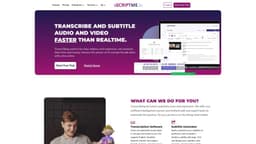
ScriptMe provides fast and accurate transcriptions and subtitling in multiple languages.
Introduction
ScriptMe is a transcription and subtitling service that offers fast and accurate transcriptions of audio and video content. It uses artificial intelligence technology to transcribe files in over 30 languages and provides a user-friendly editing page to make any necessary changes. With ScriptMe, users can also convert transcriptions into subtitles, customize them, and export them in various formats. The platform is trusted by thousands of users, including media companies, governments, universities, and individuals.
What stands out?
Fast and accurate transcription in over 30 languages
User-friendly editing page for reviewing and making changes to transcriptions
Subtitle conversion and customization
Support for multiple file formats
Option to export videos with subtitles
Collaboration and team project management
Powerful search functions for finding specific words or phrases
Highlighted text with playback for easier transcription review
Frequently Asked Questions
What is ScriptMe?
How to use ScriptMe?
How does the free trial work?
How long does it take to transcribe a file?
Is my video file private and secure?
How accurate are the transcriptions?
How does ScriptMe PRO subscription work?
What languages are supported by ScriptMe?
Can multiple teams work on the same project?
Can I export my video with subtitles?
Does ScriptMe offer tailor-made solutions?
Is there a limit to the length of audio/video files I can transcribe?
Is ScriptMe suitable for scientific research projects?
Can ScriptMe help with web accessibility compliance?
Can I share my transcriptions with others?
Is ScriptMe suitable for transcription in the telecommunications industry?
Does ScriptMe have a subtitle edit page?
Can ScriptMe work within existing internal systems?
Is there a limit to the number of projects I can create in ScriptMe?
Can I search for specific words or phrases in a project?
Do the transcriptions have playback functionality?
More Information
ScriptMe Support Email & Customer service contact & Refund contact etc.
Here is the ScriptMe support email for customer service: [email protected] . More Contact, visit the contact us page(https://scriptme.io/contact-us/)
ScriptMe Company
ScriptMe Company name: Scriptme AB . ScriptMe Company address: Nybohovsbacken 23 117 46 Stockholm.
ScriptMe Login
ScriptMe Login Link: https://app.scriptme.io/login
ScriptMe Pricing
ScriptMe Pricing Link: https://scriptme.io/pricing/
ScriptMe Facebook
ScriptMe Facebook Link: https://www.facebook.com/ScriptMeSweden
ScriptMe Youtube
ScriptMe Youtube Link: https://www.youtube.com/channel/UCWyiwU5sRYeiwzxZHhE7ONg
ScriptMe Linkedin
ScriptMe Linkedin Link: https://www.linkedin.com/company/scriptme/
ScriptMe Instagram
ScriptMe Instagram Link: https://www.instagram.com/scriptmesweden/
Reviews & Feedback
Share your experience with the community
0.0
Based on 0 reviews
User Comments (0)
Sort Criteria
Order
No reviews yet. Be the first to share your thoughts!
Statistics
Monthly visits
NaN
Saved by users
0
Rating
0.0/ 5.0
Added on
—
Similar Tools

OpusClip Captions
Easily add animated captions to your videos with just one click using this innovative application. Enhance your videos instantly!

NoteGPT
Summarize videos, articles, and text with AI. Chat with AI assistant. Transcript generator. Automated note-taking. Folder management.

Kapwing
Collaborate online with Kapwing to create, customize, and expand your content effortlessly.
Use Cases
- Media and entertainment: Transcription, subtitling, and logging for reality shows, interviews, documentaries, movies, and news media
- Governments and municipalities: Compliance with EU Web Accessibility Directive, GDPR secure and on-premises solutions
- Universities and students: Transcribing lectures, scientific interviews, and making lectures accessible
- Sales and communication: Indexing sales calls for later analytics
- Hospitals and medical students: Tailor-made solutions for medical professionals, researchers, and scientists
- Individuals and small businesses: Transcribing meetings, webinars, podcasts, and subtitling videos for clients
How to Use
To use ScriptMe, simply upload your audio or video files, choose the desired language, and click 'transcribe'. The AI-powered transcription engine will convert your files into text in minutes. You can then use the editing page to review and make any necessary changes to the transcriptions. If needed, you can also convert the transcriptions into subtitles by clicking 'convert to subtitles' and customize them using the subtitle edit page. Finally, you can export the files in different formats and share them with others.