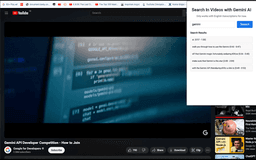
Search in YouTube Videos with AI - Chrome Extension
AI-powered YouTube video search tool
AI-powered toolYouTube video searchTranscription fetching
Introduction
Search in YouTube Videos with AI is a powerful tool that uses artificial intelligence to fetch transcriptions of YouTube videos, enabling users to search for specific keywords and quickly navigate to relevant parts of the video.
Key Features
AI-Powered Transcriptions
AI-Enhanced Keyword Search
Effortless Navigation
Seamless Integration
User-Friendly Interface
Frequently Asked Questions
What is Search in YouTube Videos with AI?
How to use Search in YouTube Videos with AI?
Is my data stored on external servers?
Can I use this tool on any browser?
Similar Tools
Pronounce
Enhance your English pronunciation and communication skills with our AI speech checker app. Perfect your spoken English today!

Meeting.ai
An advanced tool using AI to transcribe, organize, and summarize meetings efficiently. Ideal for enhancing productivity and collaboration.
Good Tape
Easily convert audio files into text with our automatic transcription service. Fast and accurate speech-to-text conversion at your fingertips.
Use Cases
- Quickly find specific topics within educational content
- Jump to features in product demos
- Locate key moments in interviews and talks
- Skip to specific steps in recipe videos
How to Use
Install the Chrome extension, watch YouTube videos, search for keywords, and click on search results to jump to relevant video timestamps.