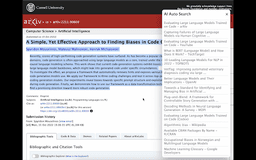
Search Support - Chrome Extension
Simplifies research by providing related information for selected text.
Introduction
Search Support simplifies research by providing related information for selected text on websites or chatGPT. A 'search' button appears after highlighting text, displaying relevant materials in a pop-up window. Saves time and streamlines research process.
What stands out?
Provides related information for selected text
Saves time and streamlines research process
Highlights text on websites or chatGPT
Displays relevant materials in a pop-up window
Frequently Asked Questions
What is Search Support?
How to use Search Support?
Can I use Search Support on any website?
Does Search Support only work with chatGPT?
Is Search Support free to use?
Reviews & Feedback
Share your experience with the community
0.0
Based on 0 reviews
User Comments (0)
Sort Criteria
Order
No reviews yet. Be the first to share your thoughts!
Statistics
Monthly visits
NaN
Saved by users
0
Rating
0.0/ 5.0
Added on
—

Use Cases
- Academic research
- Writing essays or articles
- Gathering information for projects
- Fact-checking
How to Use
To use Search Support, simply highlight any text on websites or chatGPT and click on the 'search' button that appears. A pop-up window will display relevant materials related to the selected text.