Secoda - Chrome Extension
Enhance collaboration with metadata management
Introduction
A tool for managing metadata and enhancing collaboration in BI and data warehouse tools
What stands out?
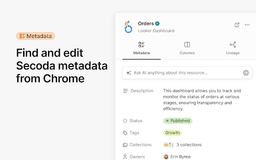
Metadata editing in popular BI tools
Resource lineage access
AI-powered chat support
Text extraction from websites
Frequently Asked Questions
What is Secoda?
How to use Secoda?
How can I install the Secoda extension?
Reviews & Feedback
Share your experience with the community
0.0
Based on 0 reviews
User Comments (0)
Sort Criteria
Order
No reviews yet. Be the first to share your thoughts!
Statistics
Monthly visits
NaN
Saved by users
0
Rating
0.0/ 5.0
Added on
—
Use Cases
- Edit metadata directly in Looker
- Access lineage in Tableau
- Chat with Secoda AI for insights
- Extract text for analysis
How to Use
Install Secoda extension and integrate with BI and data warehouse tools. Use features like editing metadata, accessing lineage, chatting with Secoda AI, and extracting text from websites.