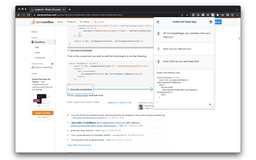
SnippetSage - Chrome Extension
Enhance coding with GPT-powered snippets, chatbot, code generation, optimization, and debugging support.
Introduction
GPT-powered Chrome extension that detects code snippets, offers real-time chatbot assistance, code generation, optimization, and debugging support for developers.
What stands out?
Code snippet detection
Real-time chatbot assistance
Code generation
Optimization support
Debugging support
Frequently Asked Questions
What is SnippetSage?
How to use SnippetSage?
Is SnippetSage compatible with all code editors?
Can I use SnippetSage for multiple programming languages?
Is the real-time chatbot available 24/7?
Does SnippetSage require an internet connection?
Reviews & Feedback
Share your experience with the community
0.0
Based on 0 reviews
User Comments (0)
Sort Criteria
Order
No reviews yet. Be the first to share your thoughts!
Statistics
Monthly visits
NaN
Saved by users
0
Rating
0.0/ 5.0
Added on
—
Similar Tools


Use Cases
- Learning and practicing coding
- Writing more efficient and optimized code
- Getting instant assistance while coding
- Improving debugging skills
How to Use
To use SnippetSage, simply install the Chrome extension and open your code editor. The extension will automatically detect code snippets and provide helpful suggestions and assistance. You can also access the real-time chatbot for instant support and use the code generation, optimization, and debugging features to enhance your coding skills.