EasyNote - Chrome Extension
A convenient website to speak or write notes, customized with images and fonts.
note creationvoice-to-textcustomization
Introduction
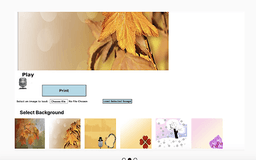
EasyNote is a website that allows you to speak and create notes or simply copy and paste text to send a note for any occasion. It offers the convenience of voice-to-text feature and provides the option to customize the note with background images and fonts, which can then be printed.
Key Features
Voice-to-text functionality for easy note creation
Customizable with various background images
Option to upload personal images for notes
Selection of different font styles
Printing capability
Frequently Asked Questions
What is EasyNote?
How to use EasyNote?
How accurate is the voice-to-text feature?
Can I use my own images as background for the notes?
Can I edit the text after it has been converted from speech?
Is EasyNote free to use?
Can I save my notes for future reference?
Similar Tools

Vbee AIVoice
Revolutionize content creation with our AI voice solution, designed for seamless integration and efficient workflow optimization.

Sohri
Discover the Sohri app for all your needs. Find everything you're looking for in one convenient place. Download now for a seamless experience.

WayStars AI- Your Unified AI Platform
WayStars AI is a comprehensive suite of AI tools that combines advanced models, productivity features, and creative functions into one seamless platform. Unleash the power of AI with WayStars.
Use Cases
- Sending notes for Thanksgiving
- Creating festive notes for special occasions
- Expressing messages for any other event
- Having fun by speaking or writing notes
How to Use
To use EasyNote, you can either speak your message using the built-in voice-to-text feature or copy and paste the desired text into the note. After that, you can choose a background image from the provided options or upload your own image. Additionally, you can select a font style that suits your preference. Finally, you can print the note.