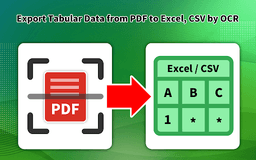
Table OCR - Chrome Extension
Extract data from tables effortlessly
OCRData ExtractionMachine Learning
Introduction
Table OCR (Optical Character Recognition) is a technology that utilizes machine learning and artificial intelligence algorithms to extract data from tables in various formats, such as scanned images or PDF documents. It allows for the automatic recognition and conversion of tabular data into structured formats like Excel spreadsheets, eliminating the need for manual data entry. Table OCR has become increasingly important for businesses, as it allows for faster and more accurate processing of data, reducing errors and increasing efficiency. It can be used in a variety of industries, including finance, healthcare, and retail, and is a valuable tool for any organization that deals with large amounts of data.
Key Features
Automatic data extraction from tables
Conversion of tabular data into Excel spreadsheets
Frequently Asked Questions
What is Table OCR?
How to use Table OCR?
Where does the data stay when using Table OCR?
Similar Tools

LimeChat
Revolutionize your e-commerce business with our AI-powered platform that offers support and marketing through WhatsApp. Boost sales and engagement now!

Gethookd
Revolutionize your ad creation and performance with our AI platform. Optimize your ads like never before for maximum results.
Clodura.AI
Discover GenAI, the ultimate sales prospecting platform for generating leads and engaging with potential customers effectively.
Use Cases
- Automate accounts payable with invoice data capture
- Convert certificate of insurance to actionable data
How to Use
Capture data from tables in invoices, contracts, forms, bills of lading, and more. Convert tables into structured formats with ease.