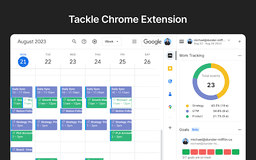
Tackle - Chrome Extension
Automated time-tracking with insightful reports
Introduction
Tackle helps you automatically track time, gain productivity insights, and generate customized reports from Google Calendar and other tools.
What stands out?
Automated time tracking
Customized reports
Intuitive workflows
Team time tracking
Dynamic dashboards
Export timesheets
Frequently Asked Questions
What is Tackle?
How to use Tackle?
Is Tackle SOC2 certified?
Reviews & Feedback
Share your experience with the community
0.0
Based on 0 reviews
User Comments (0)
Sort Criteria
Order
No reviews yet. Be the first to share your thoughts!
Statistics
Monthly visits
NaN
Saved by users
0
Rating
0.0/ 5.0
Added on
—
Similar Tools

Use Cases
- Agencies managing resources
- Coaching and consultancy time tracking
- Revenue ops for sales efficiency
- Customer-facing teams activities tracking
- Automated calendar audits for executives
- Tracking projects for product and engineering teams
How to Use
1. Install the add-on on Google Calendar. 2. Sign up via Tackle’s Google Calendar sidebar. 3. Create tags and properties. 4. Add tags to events. 5. Analyze data by changing date range. 6. Export data to Google Sheets. 7. Log in to the web app.