Takomo.ai
Takomo.ai is a no-code AI builder that simplifies the creation of unique AI applications and integration into projects.
Introduction
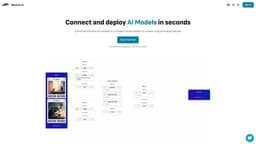
Takomo.ai is a no-code AI builder that allows users to easily create unique AI applications by drag, drop, and connecting pre-trained ML models. It enables users to generate an API for their pipeline in minutes, making it simple to integrate AI functionalities into their projects.
What stands out?
Drag, drop, and connect pre-trained ML models
Generate APIs for AI pipelines
Combine the best AI models in a visual builder
Support for image generation, text generation, speech generation, and more
Access to stable diffusion, GPT, Whisper, Bark, Kandinsky, ControlNet, Real-ESRGAN, and GFPGAN models
Scalable and affordable pricing
Expert support from ML engineers
Frequently Asked Questions
What is Takomo.ai?
How to use Takomo.ai?
What is Takomo.ai?
How can I use Takomo.ai?
What are the core features of Takomo.ai?
What are the use cases of Takomo.ai?
Does Takomo.ai have pricing information available?
More Information
Takomo.ai Discord
Here is the Takomo.ai Discord: https://discord.com/invite/UucQeC3VPH. For more Discord message, please click here(/discord/uucqec3vph).
Takomo.ai Login
Takomo.ai Login Link: https://go.takomo.ai/recent
Takomo.ai Sign up
Takomo.ai Sign up Link: https://go.takomo.ai/recent
Takomo.ai Pricing
Takomo.ai Pricing Link: https://www.takomo.ai/#models
Takomo.ai Youtube
Takomo.ai Youtube Link: https://www.youtube.com/@DataCrunchIO
Takomo.ai Twitter
Takomo.ai Twitter Link: https://twitter.com/Takomo_ai
Reviews & Feedback
Share your experience with the community
0.0
Based on 0 reviews
User Comments (0)
Sort Criteria
Order
No reviews yet. Be the first to share your thoughts!
Statistics
Monthly visits
NaN
Saved by users
0
Rating
0.0/ 5.0
Added on
—
Similar Tools

Airtable Assistant
Easily create apps and analyze data with our AI tool, no coding required. Build and analyze without the hassle of programming.

Grok
AI assistant that promotes truth and objectivity with various features.

NoteGPT
Summarize videos, articles, and text with AI. Chat with AI assistant. Transcript generator. Automated note-taking. Folder management.

PixAI - AI Art Generator
Create stunning anime art effortlessly.

DeepAI
AI tools for creative people.
Use Cases
- Create unique AI applications by combining the best AI models
- Generate highly detailed images, conversational text, audio transcriptions, and speech from text
- Alter and enhance images using natural language instructions
- Guide image generation to specific areas using edge maps
- Upscale and restore images without losing quality or detail
- Enhance text prompts for more creative image generations
- Optimize chatbots, analyze audio, summarize and classify text, and more
How to Use
1. Create Pipeline: Start by connecting pre-trained ML models in a visual builder to create your own pipeline. 2. Preview Outputs: Run, test, and refine your pipeline by comparing outputs easily. 3. Deploy API: Generate multi-model APIs with a reliable cloud infrastructure to deploy your AI models.