Tali Chrome Extension - Chrome Extension
Dictate medical notes and access databases seamlessly
Introduction
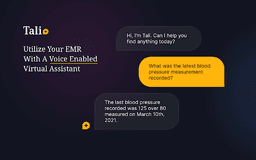
A Chrome extension for dictating medical notes and accessing medical databases within Electronic Health Records (EHR) software.
What stands out?
Voice dictation for medical notes
Direct access to evidence-based medical databases
Seamless integration with EHR software
Frequently Asked Questions
What is Tali Chrome Extension?
How to use Tali Chrome Extension?
How do I install Tali Chrome Extension?
Reviews & Feedback
Share your experience with the community
0.0
Based on 0 reviews
User Comments (0)
Sort Criteria
Order
No reviews yet. Be the first to share your thoughts!
Statistics
Monthly visits
NaN
Saved by users
0
Rating
0.0/ 5.0
Added on
—
Similar Tools

Use Cases
- Dictating patient consultation notes
- Quickly searching for medical information during patient visits
How to Use
1. Click 'Add to Chrome' to install the extension. 2. Log in with Google through the widget. 3. Select text area, click microphone icon, and start dictating. 4. Enable microphone access for Tali to enter notes into EMR.