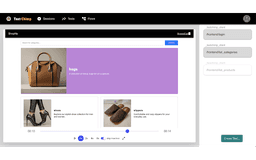
TestChimp - Chrome Extension
No code platform for full stack automation tests
No code platformAutomation testingChrome extension
Introduction
TestChimp is a powerful no code platform for building full stack automation tests from manual test sessions. This chrome extension captures UI + API activity during manual tests, which are automatically exported to your TestChimp account. Users can easily build automation tests from these recordings, collaborate with other team members, and scale up test automation efficiently.
Key Features
Automating full stack tests from manual sessions
UI + API activity capture during manual tests
Intelligent suggestions for assertions and variables based on recorded payloads
Dynamic test data configuration for request fields
Frequently Asked Questions
What is TestChimp?
How to use TestChimp?
What does TestChimp capture during manual tests?
Can I collaborate with team members using TestChimp?
Similar Tools

Gallabox
Elevate your business communication with our No-code WhatsApp automation tool. Streamline processes and engage customers effortlessly.

Onepage
Create websites, landing pages, and quizzes with our versatile all-in-one tool. Simplify your online presence in one convenient platform.
DhiWise
Revolutionize your software development process with the Agentic AI platform - the ultimate tool for automating the software development lifecycle.
Use Cases
- Building automation tests from manual test recordings
- Collaborating with team members on test automation
- Scaling up test automation efficiently
How to Use
Using TestChimp is straightforward. Simply run manual tests while the chrome extension captures UI + API activities. These recordings are then automatically exported to your TestChimp account, where you can build automation tests, collaborate, and scale up test automation.