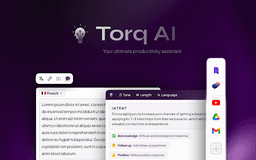
Torq AI - Chrome Extension
AI-powered browsing assistant
AI assistantChrome ExtensionSmart replies
Introduction
Torq AI is an advanced browsing assistant powered by state-of-the-art AI capabilities. Elevate your browsing experience, bolster productivity, and access smart features like the new 'Sidebar'.
Key Features
AI Smart Reply and Response Generation
Gmail Smart Reply Feature
Efficient Data Access
Seamless Browsing Experience
Newly Introduced Sidebar
Frequently Asked Questions
What is Torq AI?
How to use Torq AI?
How to use Torq AI on Chrome?
Similar Tools

LimeChat
Revolutionize your e-commerce business with our AI-powered platform that offers support and marketing through WhatsApp. Boost sales and engagement now!

Plagiarism Remover
Eliminate plagiarism in your text with this free AI tool. Enhance your writing by rephrasing content effortlessly. Try it now!

iSlide
Simplify your PowerPoint design with our innovative platform, offering a wide range of templates and AI tools to enhance your presentations.
Use Cases
- Engaging in dynamic conversations about any topic using AI Smart Reply
- Navigating Gmail communications effectively with Smart Reply feature
How to Use
Interact with Torq AI by selecting text and clicking on the Torq AI icon for inquiries about your reading. Access the Sidebar using Alt + T shortcut for an interactive chat experience.