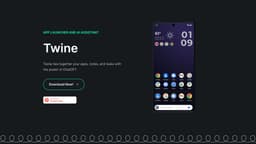
Twine AI Launcher
AI-powered Android launcher for easy app organization.
Introduction
The Twine Launcher is a new type of launcher that integrates an AI Assistant into your homescreen and organizes your apps based on how you use them.
What stands out?
Integrates an AI Assistant into your homescreen
Organizes your apps based on usage
Quick access to quick answers
Create notes and tasks with AI Assistant
Remember information about people
Frequently Asked Questions
What is Twine AI Launcher?
How to use Twine AI Launcher?
Is Twine AI Launcher available for iOS?
Does Twine AI Launcher use machine learning?
Can I customize the appearance of Twine AI Launcher?
More Information
Twine AI Launcher Support Email & Customer service contact & Refund contact etc.
Here is the Twine AI Launcher support email for customer service: [email protected] .
Twine AI Launcher Company
Twine AI Launcher Company name: Massmotion .
Twine AI Launcher Twitter
Twine AI Launcher Twitter Link: https://twitter.com/paulmcdonald
Reviews & Feedback
Share your experience with the community
0.0
Based on 0 reviews
User Comments (0)
Sort Criteria
Order
No reviews yet. Be the first to share your thoughts!
Statistics
Monthly visits
NaN
Saved by users
0
Rating
0.0/ 5.0
Added on
—
Use Cases
- Getting quick answers to questions
- Managing notes and tasks on your homescreen
- Accessing information about people in your life
How to Use
To use Twine AI Launcher, simply download the app from the website. Once installed, it will integrate an AI Assistant into your homescreen, allowing you to access quick answers, create notes and tasks, and remember information about people in your life.