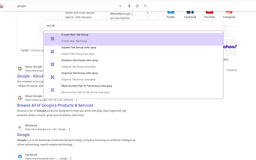
Typee - A Browser Command Line - Chrome Extension
Browser productivity tool for faster interaction.
Introduction
Typee Browser Extension is a keyboard first productivity tool that helps you interact with the browser and AI faster and more efficiently.
What stands out?
Tab management
Tab Group management
Window management
Twitter Interactive
Alias Management
Frequently Asked Questions
What is Typee - A Browser Command Line?
How to use Typee - A Browser Command Line?
Reviews & Feedback
Share your experience with the community
0.0
Based on 0 reviews
User Comments (0)
Sort Criteria
Order
No reviews yet. Be the first to share your thoughts!
Statistics
Monthly visits
NaN
Saved by users
0
Rating
0.0/ 5.0
Added on
—

How to Use
To activate Typee, press Shift + J or change the shortcut in chrome://extensions/shortcuts. Typee currently supports tab management, tab group management, window management, Twitter interactive, and alias management. Custom commands and AI integration are coming soon.