Introduction
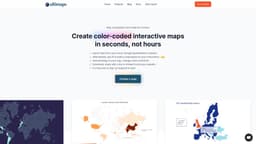
Ultimaps is an online app that allows its users to create color-coded maps and charts from Excel files or AI prompts in seconds. Maps can be exported into a printable format or extended with interactive elements and shared via link or embedded onto a website. With the AI support we recently added, your can now craft your map charts and visualizations as easy as typing "I want a map of Europe with France, Spain and Italy colored in red, Nordic countries in blue, every other country in white. Also, make the background grey." Make your visualizations live with interactive elements, such as tooltips and popup windows, allowing you to enrich your visualization with extra information. No specific knowledge required - we want it to be easy for everyone!
Key Features
Use AI to build a map based on your instructions
Import data from your Excel, Google Spreadsheet or Notion
Add drawings to your map, change colors and fonts
Create maps with interactive elements
Download, share with a link or embed it onto your website
Frequently Asked Questions
What is Ultimaps?
How to use Ultimaps?
Similar Tools
Civitai green
Discover and share generative AI art and models on our platform dedicated to showcasing innovative and creative creations. Explore now!

Picsart
Unleash your creativity with Picsart - an innovative photo editing app that offers a wide range of tools and filters to enhance your images.

WayStars AI- Your Unified AI Platform
WayStars AI is a comprehensive suite of AI tools that combines advanced models, productivity features, and creative functions into one seamless platform. Unleash the power of AI with WayStars.
Use Cases
- Presentations
- Infographics
- Mapping
- Data Analytics
- Sales Territory Maps
How to Use
In Ultimaps Studio, select the desired base map (e.g. the map of the United States), choose "Use AI" option and type your instructions, for example: "I want Oklahoma, Texas, Arkansas, Louisana to be pink, California and Arizona to be orange, Michigan, Ohio, Minnesota to be yellow. Make every other state white, and fill background with #CCCCDD."