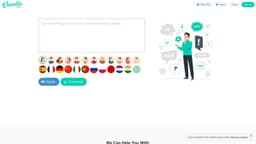
VanillaVoice
A free text to speech tool with human-like voices.
Introduction
This is a free text to speech tool that can turn any text into human-sounding speech. It offers a variety of voices to choose from, including male, female, and child voices.
What stands out?
Free text to speech tool
Multiple voice options (male, female, child)
High-quality human-like voices
Ability to download audio files
Frequently Asked Questions
What is VanillaVoice?
How to use VanillaVoice?
What is VanillaVoice?
Can I choose between different voices?
Can I download the generated audio files?
What are some use cases for VanillaVoice?
Is VanillaVoice free to use?
Are the voices generated by VanillaVoice human-like?
What languages and accents are supported by VanillaVoice?
What are some unique features of VanillaVoice?
Who should use VanillaVoice?
How can I provide feedback or get in touch with VanillaVoice?
Is my personal information safe when using VanillaVoice?
Is VanillaVoice available on mobile devices?
Does VanillaVoice use cookies?
More Information
VanillaVoice Support Email & Customer service contact & Refund contact etc.
Here is the VanillaVoice support email for customer service: [email protected] . More Contact, visit the contact us page(https://www.vanillavoice.com/contact)
VanillaVoice Company
More about VanillaVoice, Please visit the about us page(https://interactive32.com).
VanillaVoice Login
VanillaVoice Login Link: https://www.vanillavoice.com/login
VanillaVoice Sign up
VanillaVoice Sign up Link: https://www.vanillavoice.com/register
VanillaVoice Pricing
VanillaVoice Pricing Link: https://www.vanillavoice.com/pricing
VanillaVoice Facebook
VanillaVoice Facebook Link: https://www.facebook.com/sharer/sharer.php?u=https%3A%2F%2Fwww.vanillavoice.com%3Fref%3Dfb
VanillaVoice Twitter
VanillaVoice Twitter Link: https://twitter.com/intent/tweet?text=VanillaVoice%20-%20Turn%20any%20text%20into%20Human-Sounding%20Speech.%20%20https://www.vanillavoice.com/?ref=tw
Reviews & Feedback
Share your experience with the community
0.0
Based on 0 reviews
User Comments (0)
Sort Criteria
Order
No reviews yet. Be the first to share your thoughts!
Statistics
Monthly visits
NaN
Saved by users
0
Rating
0.0/ 5.0
Added on
—
Use Cases
- Creating professional videos with a trustworthy voice
- Enhancing presentations with audio narration
- Making explainer videos more engaging
- Producing online video courses with narrated content
How to Use
To use VanillaVoice, simply input the text you want to convert into speech and select the desired voice. Then, click the 'Speak' button to generate the audio. You can also download the audio file if needed.