vidyo.ai
vidyo.ai helps repurpose podcasts and videos into shareable clips for social media.
Introduction
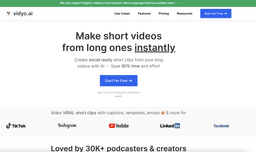
vidyo.ai is an AI platform that helps users repurpose long form podcasts and videos into shorter shareable clips for platforms like TikTok, Reels, and Shorts.
What stands out?
CutMagic: Effortlessly handle and edit multi-cam and complex videos.
AI Emoji: Automatically detects sentences that require emojis.
AI Captions: Subtitle videos with the magic of AI.
Video Resizing: Easily switch between portrait, landscape, square, and more video sizes.
Content Repurposing: Create social ready short clips from long videos with AI.
Video Clipping: Use powerful video clipping tools for making short videos.
Auto Video Chapters: Auto-detects crucial segments of your video and organizes them into distinct chapters.
Frequently Asked Questions
What is vidyo.ai?
How to use vidyo.ai?
0
1
2
3
More Information
vidyo.ai Discord
Here is the vidyo.ai Discord: https://discord.gg/M8rJ4c2zvZ. For more Discord message, please click here(/discord/m8rj4c2zvz).
vidyo.ai Support Email & Customer service contact & Refund contact etc.
Here is the vidyo.ai support email for customer service: [email protected] .
vidyo.ai Company
More about vidyo.ai, Please visit the about us page(https://vidyo.ai/about-us).
vidyo.ai Login
vidyo.ai Login Link: https://app.vidyo.ai/auth/login
vidyo.ai Sign up
vidyo.ai Sign up Link: https://app.vidyo.ai/auth/login
vidyo.ai Pricing
vidyo.ai Pricing Link: https://vidyo.ai/pricing
vidyo.ai Youtube
vidyo.ai Youtube Link: https://www.youtube.com/@vidyoai
vidyo.ai Linkedin
vidyo.ai Linkedin Link: https://www.linkedin.com/company/vidyo-ai/
vidyo.ai Twitter
vidyo.ai Twitter Link: https://twitter.com/vidyoai
vidyo.ai Instagram
vidyo.ai Instagram Link: https://www.instagram.com/vidyo.ai/
Reviews & Feedback
Share your experience with the community
0.0
Based on 0 reviews
User Comments (0)
Sort Criteria
Order
No reviews yet. Be the first to share your thoughts!
Statistics
Monthly visits
NaN
Saved by users
0
Rating
0.0/ 5.0
Added on
—
Similar Tools

OpusClip Captions
Easily add animated captions to your videos with just one click using this innovative application. Enhance your videos instantly!

NoteGPT
Summarize videos, articles, and text with AI. Chat with AI assistant. Transcript generator. Automated note-taking. Folder management.

Kapwing
Collaborate online with Kapwing to create, customize, and expand your content effortlessly.
Use Cases
- Podcasters
- Agencies
- Zoom Webinar Marketers
- Video Creators
- Small Businesses
How to Use
To use vidyo.ai, follow these steps: 1. Upload a video from your computer or provide a YouTube link. 2. Set your preferences for platforms, formats, and templates. 3. Customize your video with features like AI captions, video resizing, video clipping, and more. 4. Get your customized instant short videos ready to share on social media platforms.