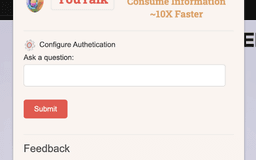
YouTalk - Chrome Extension
Ask questions to video content and get instant YouTube snippets responses.
videoquestionsYouTube
Introduction
YouTalk is a platform that enables users to ask questions directly to video content and receive instant, relevant YouTube snippets responses based on the video's content.
Key Features
Real-time question-asking
Instant YouTube snippets responses
Relevance based on video content
Frequently Asked Questions
What is YouTalk?
How to use YouTalk?
How accurate are the YouTube snippets responses?
Can I ask questions in any language?
Can I use YouTalk on mobile devices?
Is YouTalk free?
Similar Tools

Gallabox
Elevate your business communication with our No-code WhatsApp automation tool. Streamline processes and engage customers effortlessly.

LimeChat
Revolutionize your e-commerce business with our AI-powered platform that offers support and marketing through WhatsApp. Boost sales and engagement now!

Gethookd
Revolutionize your ad creation and performance with our AI platform. Optimize your ads like never before for maximum results.
Use Cases
- { "case": "Learning new skills", "example": "Ask a question during a Photoshop tutorial and receive a snippet response explaining a specific technique.", "description": "YouTalk can be used to enhance learning new skills by asking questions directly to video tutorials and receiving instant, relevant YouTube snippets responses." }
- { "case": "Researching", "example": "Ask a question about a historical event during a documentary and receive a snippet response providing more details.", "description": "YouTalk is useful for research purposes as it allows users to ask questions directly to educational videos and receive instant YouTube snippets responses that provide additional information." }
- { "case": "Entertainment", "example": "Ask a question about a plot twist during a movie trailer and receive a snippet response explaining the twist.", "description": "YouTalk adds an interactive element to entertainment content by allowing users to ask questions and receive relevant YouTube snippets responses that enhance their viewing experience." }
How to Use
To use YouTalk, simply search for a video on the platform and click on it to begin watching. While watching, you can ask questions by typing them into the designated chat box. You will then receive instant, relevant YouTube snippets responses based on the video's content.