Custom SRT Loader for YouTube - Chrome Extension
Load custom SRT subtitles for YouTube videos easily.
Introduction
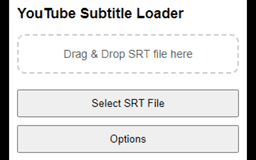
This extension allows users to upload custom SRT subtitle files for YouTube videos, enhancing accessibility and personalization. Developed as a solution for users unable to find functional subtitle loader extensions, it offers customization options for subtitle appearance and works seamlessly with YouTube's video player.
What stands out?
Simple UI
Upload SRT files for any YouTube video
Customize subtitle appearance (size, color, position)
Compatible with YouTube's standard video player
Frequently Asked Questions
What is Custom SRT Loader for YouTube?
How to use Custom SRT Loader for YouTube?
Is my data collected when using this SRT loader?
Can I customize subtitle appearance?
Reviews & Feedback
Share your experience with the community
0.0
Based on 0 reviews
User Comments (0)
Sort Criteria
Order
No reviews yet. Be the first to share your thoughts!
Statistics
Monthly visits
NaN
Saved by users
0
Rating
0.0/ 5.0
Added on
—
Similar Tools

OpusClip Captions
Easily add animated captions to your videos with just one click using this innovative application. Enhance your videos instantly!

NoteGPT
Summarize videos, articles, and text with AI. Chat with AI assistant. Transcript generator. Automated note-taking. Folder management.

Kapwing
Collaborate online with Kapwing to create, customize, and expand your content effortlessly.
Use Cases
- Add personalized subtitles for accessibility or language learning on YouTube videos.
How to Use
To use this extension, open a YouTube video, click the extension icon, and upload your SRT file.