ASKWay - Chrome Extension
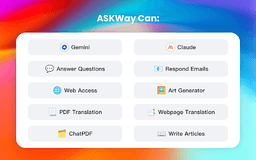
Meet your ultimate AI assistant - the one app to rule them all. Simplify your tasks, boost productivity, and stay organized effortlessly.
Introduction
What stands out?
Detailed Review
In-depth analysis and overview
ASKWay - Chrome Extension Review:
As a busy professional, ASKWay has been a game-changer for me. With its AI assistant powered by GPT-4, I can easily navigate through various websites and get accurate and relevant information in a matter of seconds. The extension is user-friendly and seamlessly integrates into my browsing experience. Whether I'm researching for work or simply browsing for personal interests, ASKWay has become my go-to tool for quick and reliable assistance. I highly recommend it to anyone looking to enhance their online productivity and efficiency.
Frequently Asked Questions
What does ASKWay refer to?
What are the steps for using ASKWay?
Can you explain what ASKWay is?
What are the steps for using ASKWay?
How can I update the ASKWay extension?
Does ASKWay cost anything to use?
Is a ChatGPT/OpenAI account required?
Is there a mobile application available for ASKWay?
Which search engines are currently supported by ASKWay?
Reviews & Feedback
Share your experience with the community
User Comments (0)
No reviews yet. Be the first to share your thoughts!
Statistics
Similar Tools

Kagi Search
Discover a top-tier search engine that prioritizes user privacy and delivers an exceptional browsing experience.

Immersive Translate
Experience a free tool for translating webpages and documents into multiple languages. Enjoy bilingual translations with ease.

Sider
Seamlessly integrate AI into your daily workflow.

Monica - Your ChatGPT AI Assistant Chrome Extension
Easily chat and write with our AI assistant, simplifying your communication and content creation tasks. Get started now!

DeepL
DeepL is a highly accurate translator that translates texts and documents instantly.
Use Cases
- Experience seamless networking data updates, engaging chatbot interactions, instant intelligent responses, convenient access to prompt libraries, and efficient text processing with ASKWay. Translate webpages and PDFs effortlessly with shortcut commands and elevate your writing with AI-powered copy suggestions.