Chat GPT for Gmail Chrome Extension - Chrome Extension
AI-powered email assistant for Gmail users
Introduction
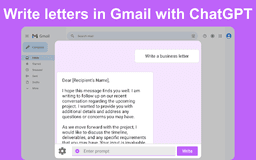
The Chat GPT for Gmail Chrome Extension is an AI-powered tool that integrates seamlessly into Gmail to assist users in drafting, editing, and managing emails efficiently. It enhances communication by providing intelligent suggestions, automating email writing, and learning from the user's writing style.
What stands out?
AI-driven writing assistance directly in Gmail
Professional and precise email drafting
Smart suggestions and contextually aware replies
Frequently Asked Questions
What is Chat GPT for Gmail Chrome Extension?
How to use Chat GPT for Gmail Chrome Extension?
Is Chat GPT for Gmail Chrome Extension free to use?
Can Chat GPT for Gmail learn from my writing style?
Reviews & Feedback
Share your experience with the community
0.0
Based on 0 reviews
User Comments (0)
Sort Criteria
Order
No reviews yet. Be the first to share your thoughts!
Statistics
Monthly visits
NaN
Saved by users
0
Rating
0.0/ 5.0
Added on
—
Similar Tools

Airtable Assistant
Easily create apps and analyze data with our AI tool, no coding required. Build and analyze without the hassle of programming.

Grok
AI assistant that promotes truth and objectivity with various features.

AI PDF Summarizer by PDF Guru
Simplify PDFs with AI! Summarize, extract key points, ask questions, and translate in 80+ languages. Perfect for work, study, or research.

AI Therapy
Your personal AI therapist for round-the-clock mental health support.

Sider
Seamlessly integrate AI into your daily workflow.
Use Cases
- Enhancing productivity in professional email communications
- Maintaining high standards in correspondence
How to Use
To use the Chat GPT for Gmail Chrome Extension, simply install the extension on your Chrome browser. Once installed, open Gmail, and you will see the AI-powered features integrated into your email interface, providing assistance as you compose and reply to messages.