Keo Task Management
AI task management tool for professionals
Introduction
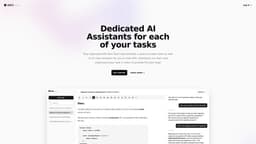
Keo is a simple but powerful task management tool designed for individual professionals. It provides an AI assistant and notes for each task to help users stay organized and focused.
What stands out?
Dedicated AI assistants for each task
Notes space for each task
Easy to use, modern interface
Frequently Asked Questions
What is Keo Task Management?
How to use Keo Task Management?
Is Keo free to use?
Can I chat with the AI assistant for each task?
More Information
Keo Task Management Company
Keo Task Management Company name: Keo.dev .
Keo Task Management Login
Keo Task Management Login Link: https://www.keo.dev/auth/login
Keo Task Management Sign up
Keo Task Management Sign up Link: https://www.keo.dev/auth/signup
Reviews & Feedback
Share your experience with the community
0.0
Based on 0 reviews
User Comments (0)
Sort Criteria
Order
No reviews yet. Be the first to share your thoughts!
Statistics
Monthly visits
NaN
Saved by users
0
Rating
0.0/ 5.0
Added on
—
Similar Tools

Airtable Assistant
Easily create apps and analyze data with our AI tool, no coding required. Build and analyze without the hassle of programming.

Grok
AI assistant that promotes truth and objectivity with various features.

AI PDF Summarizer by PDF Guru
Simplify PDFs with AI! Summarize, extract key points, ask questions, and translate in 80+ languages. Perfect for work, study, or research.

AI Therapy
Your personal AI therapist for round-the-clock mental health support.

Sider
Seamlessly integrate AI into your daily workflow.
Use Cases
- Keep track of tasks in a modern interface
- Stay organized and focused with AI assistants and notes for each task
How to Use
To use Keo, simply log in and create tasks. Each task comes with its dedicated AI assistant and notes space, allowing users to stay organized throughout their workday.