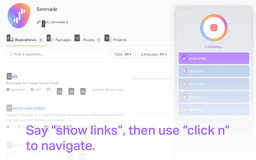
Serenade - Chrome Extension
Code by speech, boost browsing productivity.
Introduction
A code-writing tool that allows users to write code by speaking instead of typing, enhancing productivity across browsers with its Chrome extension.
What stands out?
Voice-based code writing
Browser extension for productivity enhancement
Frequently Asked Questions
What is Serenade?
How to use Serenade?
Is the Serenade native app free to download?
Reviews & Feedback
Share your experience with the community
0.0
Based on 0 reviews
User Comments (0)
Sort Criteria
Order
No reviews yet. Be the first to share your thoughts!
Statistics
Monthly visits
NaN
Saved by users
0
Rating
0.0/ 5.0
Added on
—
Similar Tools

Airtable Assistant
Easily create apps and analyze data with our AI tool, no coding required. Build and analyze without the hassle of programming.

Grok
AI assistant that promotes truth and objectivity with various features.

AI PDF Summarizer by PDF Guru
Simplify PDFs with AI! Summarize, extract key points, ask questions, and translate in 80+ languages. Perfect for work, study, or research.

Sider
Seamlessly integrate AI into your daily workflow.

AI Content Solutions
Elevate your brand with AI Content Solutions, converting AI-generated content into polished writing that reflects your brand's identity.
Use Cases
- Navigating tabs efficiently
- Browsing the web hands-free
- Interacting with web elements using voice commands
How to Use
Install the Serenade native app on Windows, macOS, or Linux, then add the Chrome extension. Speak commands to navigate, write text, manage tabs, and interact with web elements without using a mouse or keyboard.