swiftGPT.app
A macOS app for interactive conversations with OpenAI's GPT-3 language model.
Introduction
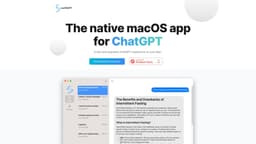
swiftGPT.app is a native macOS application designed for ChatGPT. It allows users to have interactive and engaging conversations with a language model powered by OpenAI's GPT-3.
What stands out?
swiftGPT.app offers a range of core features, including: 1. Native macOS Application: Enjoy the convenience of using ChatGPT directly on your macOS device without the need for a web browser. 2. Interactive Conversations: Engage in dynamic and interactive conversations with the AI model, creating a natural back-and-forth dialogue. 3. Human-like Responses: Experience responses from the language model that are highly coherent and emulate human conversation. 4. OpenAI GPT-3 Powered: swiftGPT.app is powered by OpenAI's GPT-3, enabling a diverse and extensive range of conversational capabilities.
Frequently Asked Questions
What is swiftGPT.app?
How to use swiftGPT.app?
What is swiftGPT.app?
How do I use swiftGPT.app?
What are the core features of swiftGPT.app?
What are the use cases for swiftGPT.app?
Is pricing information available for swiftGPT.app?
Reviews & Feedback
Share your experience with the community
0.0
Based on 0 reviews
User Comments (0)
Sort Criteria
Order
No reviews yet. Be the first to share your thoughts!
Statistics
Monthly visits
NaN
Saved by users
0
Rating
0.0/ 5.0
Added on
—
Similar Tools

Airtable Assistant
Easily create apps and analyze data with our AI tool, no coding required. Build and analyze without the hassle of programming.

Grok
AI assistant that promotes truth and objectivity with various features.

AI PDF Summarizer by PDF Guru
Simplify PDFs with AI! Summarize, extract key points, ask questions, and translate in 80+ languages. Perfect for work, study, or research.

AI Therapy
Your personal AI therapist for round-the-clock mental health support.

Sider
Seamlessly integrate AI into your daily workflow.
Use Cases
- swiftGPT.app has a variety of use cases, such as: 1. Creative Writing: Seek inspiration or generate ideas by conversing with the AI model. 2. Content Generation: Use the application to assist in generating content for blog posts, social media, or other written materials. 3. Learning and Education: Get help with understanding complex concepts or use the app as a learning tool for various subjects. 4. Language Practice: Practice a foreign language by chatting with the AI model and receiving feedback. 5. Virtual Assistance: Utilize swiftGPT.app as a virtual assistant for tasks like scheduling, reminders, and basic information retrieval.
How to Use
To use swiftGPT.app, simply download and install the application on your macOS device. Upon launching the app, you can start conversing with the AI by typing your messages in the provided chat interface. The model will respond based on the context and generate human-like text for a seamless conversation experience.