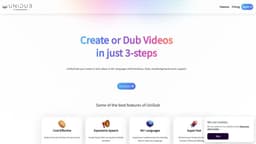
UniDub - Multi-Lingual AI Dubbing Platform
UniDub is a cost-effective AI dubbing platform for creating videos in multiple languages.
Introduction
UniDub is a multi-lingual AI dubbing platform that allows users to create or dub videos in over 40 languages. With support for emotions, style, and background music, UniDub enables users to express multiple emotions in their videos. The platform offers a cost-effective solution by significantly reducing production time compared to manual dubbing.
What stands out?
Cost-effective: Build or dub videos at a fraction of the manual cost.
Expressive speech: Create videos that can express multiple emotions.
40+ languages: Expand your audience base by reaching them in their own language.
Super fast: Minimize your production time to a fraction of manual dubbing time.
Frequently Asked Questions
What is UniDub - Multi-Lingual AI Dubbing Platform?
How to use UniDub - Multi-Lingual AI Dubbing Platform?
Does UniDub support video creation?
Can I create custom voices with UniDub?
What is the pricing for UniDub?
Is customer support available?
More Information
UniDub - Multi-Lingual AI Dubbing Platform Support Email & Customer service contact & Refund contact etc.
Here is the UniDub - Multi-Lingual AI Dubbing Platform support email for customer service: [email protected] .
UniDub - Multi-Lingual AI Dubbing Platform Company
UniDub - Multi-Lingual AI Dubbing Platform Company name: SAIVA Technology Private Limited . UniDub - Multi-Lingual AI Dubbing Platform Company address: Vijayawada, AP, India - 520015. More about UniDub - Multi-Lingual AI Dubbing Platform, Please visit the about us page(https://unidub.co/aboutus).
UniDub - Multi-Lingual AI Dubbing Platform Login
UniDub - Multi-Lingual AI Dubbing Platform Login Link: https://unidub.co/signin
UniDub - Multi-Lingual AI Dubbing Platform Sign up
UniDub - Multi-Lingual AI Dubbing Platform Sign up Link: https://unidub.co/signup
UniDub - Multi-Lingual AI Dubbing Platform Pricing
UniDub - Multi-Lingual AI Dubbing Platform Pricing Link: https://unidub.co/#pricing
UniDub - Multi-Lingual AI Dubbing Platform Facebook
UniDub - Multi-Lingual AI Dubbing Platform Facebook Link: https://www.facebook.com/unidub.co
UniDub - Multi-Lingual AI Dubbing Platform Linkedin
UniDub - Multi-Lingual AI Dubbing Platform Linkedin Link: https://www.linkedin.com/company/unidub-co
UniDub - Multi-Lingual AI Dubbing Platform Twitter
UniDub - Multi-Lingual AI Dubbing Platform Twitter Link: https://twitter.com/unidub_co
UniDub - Multi-Lingual AI Dubbing Platform Instagram
UniDub - Multi-Lingual AI Dubbing Platform Instagram Link: https://www.instagram.com/unidub.co
UniDub - Multi-Lingual AI Dubbing Platform Whatsapp
UniDub - Multi-Lingual AI Dubbing Platform Whatsapp Link: https://wa.me/+918247416366
Reviews & Feedback
Share your experience with the community
0.0
Based on 0 reviews
User Comments (0)
Sort Criteria
Order
No reviews yet. Be the first to share your thoughts!
Statistics
Monthly visits
NaN
Saved by users
0
Rating
0.0/ 5.0
Added on
—
Similar Tools

Kagi Search
Discover a top-tier search engine that prioritizes user privacy and delivers an exceptional browsing experience.

Immersive Translate
Experience a free tool for translating webpages and documents into multiple languages. Enjoy bilingual translations with ease.

Sider
Seamlessly integrate AI into your daily workflow.

Monica - Your ChatGPT AI Assistant Chrome Extension
Easily chat and write with our AI assistant, simplifying your communication and content creation tasks. Get started now!

DeepL
DeepL is a highly accurate translator that translates texts and documents instantly.
Use Cases
- Dub videos: Add emotions, style, and background music to your videos.
- Animate videos: Create animated videos with text and voices in over 40 languages.
- Custom voices: Make your own avatars and voices for a customized experience.
- Create audiobooks: Convert any story book into a video with character-wise voices.
How to Use
Using UniDub is simple and effortless. Just follow these 3 steps: 1. Upload your video and subtitles to the platform. 2. Edit the subtitles if necessary. 3. Dub the video with AI. Once the dubbing process is complete, you can download and play your video.