VideoPlus Studio
Subtitle editor with dynamic avatars.
Introduction
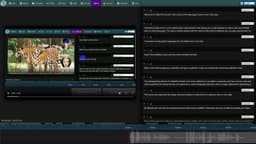
VideoPlus Studio is a free subtitle editor and translator that allows you to add subtitles to videos, edit and translate them to other languages. The distinguishing feature of VideoPlus Studio is that for every subtitle you can select a presenter, who has properties for turning the text into speeches in a certain language and voice, spoken by an avatar of your choice.
What stands out?
Free subtitle editor and translator.
Add and edit subtitles for videos.
Translation among 80 languages in one click.
Export subtitles in json and four other standard formats.
Select a presenter for each subtitle.
Avatars with lip-synced speech based on text.
Customizable avatar properties: shape, size, location.
Modify preset presenters.
Fit subtitle duration with presenter.
Play video and see text moving along with the timeline.
Submit tasks for processing and view task history.
Frequently Asked Questions
What is VideoPlus Studio?
How to use VideoPlus Studio?
What languages does VideoPlus Studio support for translation?
Can I export the subtitles in json format?
How do I add subtitles to a video?
Can I modify the properties of the presenters?
How can I fit the duration of a subtitle with its presenter?
How can I submit a task for processing?
More Information
VideoPlus Studio Support Email & Customer service contact & Refund contact etc.
More Contact, visit the contact us page(https://videoplus.studio/Contact)
VideoPlus Studio Company
VideoPlus Studio Company name: aiTransformer Technologies .
Reviews & Feedback
Share your experience with the community
0.0
Based on 0 reviews
User Comments (0)
Sort Criteria
Order
No reviews yet. Be the first to share your thoughts!
Statistics
Monthly visits
NaN
Saved by users
0
Rating
0.0/ 5.0
Added on
—
Similar Tools

Kagi Search
Discover a top-tier search engine that prioritizes user privacy and delivers an exceptional browsing experience.

Immersive Translate
Experience a free tool for translating webpages and documents into multiple languages. Enjoy bilingual translations with ease.

Sider
Seamlessly integrate AI into your daily workflow.
ChatEngGPT
Easily enhance your English skills with ChatEngGPT – the perfect tool for improving your language proficiency quickly and effectively.

Monica - Your ChatGPT AI Assistant Chrome Extension
Easily chat and write with our AI assistant, simplifying your communication and content creation tasks. Get started now!
Use Cases
- Create engaging videos with dynamic avatars.
- Translate subtitles to reach a wider audience.
- Enhance videos with visually appealing subtitles.
- Generate lip-synced avatars to speak subtitles.
How to Use
Start a new task by opening a video or subtitle file. Save subtitles to a local file. Export subtitles in json and other standard formats. Translate subtitles into another language. Undo the last change or clear all subtitles. View pricing and subscribe to a paid plan. Sign in to view/edit account info. View/Edit presenters. Submit current task to process and view task history.